Qt desktop productivity app
Tasker
A Qt desktop app that converts your Canvas .ics calendar into weighted, color-coded to-dos, built for overloaded students.
Project Overview
What is Tasker?
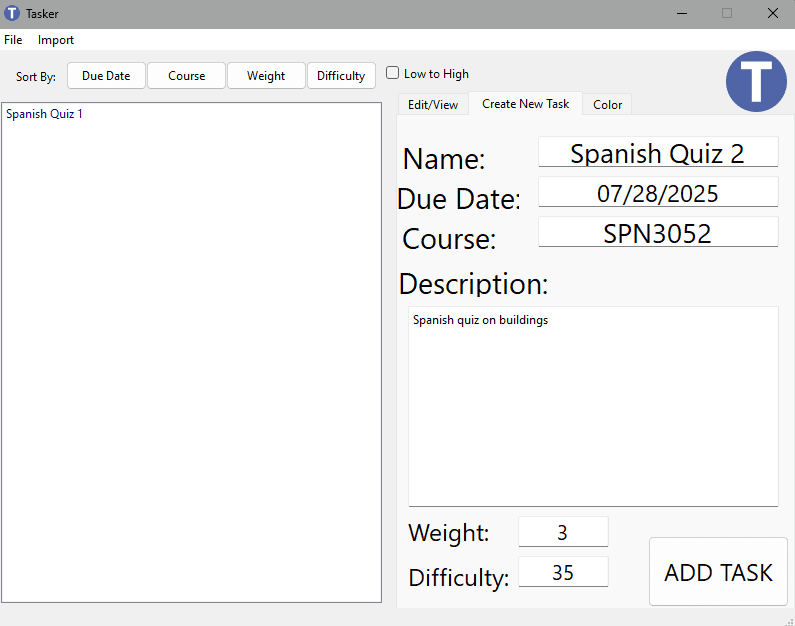
Tasker is a Qt-based desktop application designed specifically for students, allowing them to organize their assignments, quizzes, and exams into a clear, prioritized task list. A key feature is Tasker's built-in .ics importer, which lets students populate their to-do lists by importing calendar files exported from Canvas.
Tasks can be categorized by class, assigned custom grade-weight tags, rated by difficulty, and visually distinguished using color-coded labels. With dynamic sorting by due date, importance, or grade impact, Tasker helps students quickly identify and focus on their most critical tasks, simplifying task management during busy semesters.
My Role
Our team consisted of four members, tasked with building an eLearning-focused application as part of an introductory software engineering course. The primary objective was to gain hands-on experience with Agile methodology rather than solely delivering a complex product. Emphasis was placed on practicing Agile processes: presenting to various stakeholders, including clients, management, and fellow developers, maintaining documentation, and using practices such as storyboarding, sprints, regular scrum meetings, and retrospectives.
As one of two primary developers, my responsibilities centered around the backend functionality related to task management. I designed and implemented the core Task objects, established the custom .tsk file format for task storage, developed the critical .ics file importer, and contributed to parts of the Qt user interface that handled task creation and editing.
Building the user interface was a collaborative effort within our team. We frequently used pair programming sessions, collaborated remotely over calls, and synchronized changes via GitHub. This was especially useful because only one team member initially had prior experience with Qt.
Functionality Highlights
Import & Filter
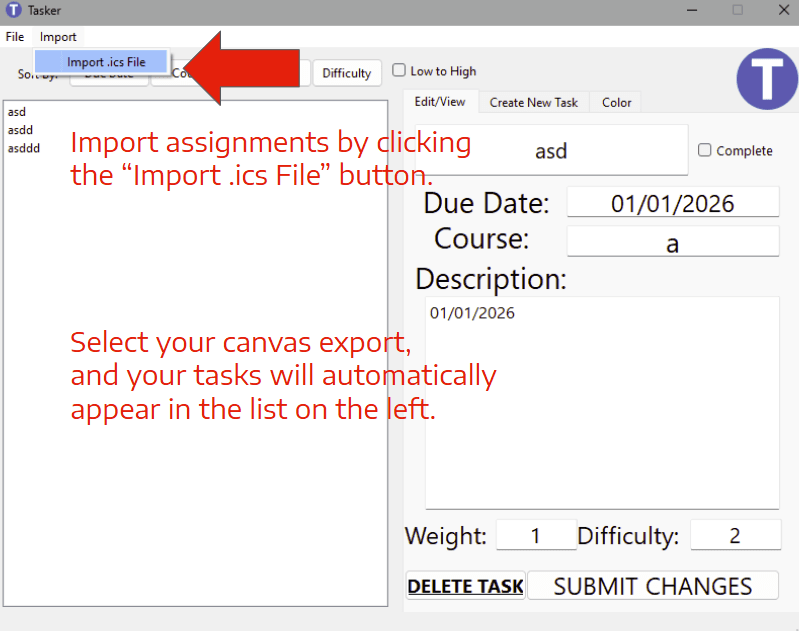
Tasker's standout feature is its seamless integration with Canvas. Rather than tackling the complexity of the Canvas API, we used Canvas's built-in calendar export feature, which provides details on assignments, quizzes, and tests. This streamlined development and helped us complete the project on time.
One challenge was handling irrelevant calendar entries, such as scheduled Zoom meetings included in the exported files. These meetings had a unique identifier, so our parser could filter them out and keep the task list focused on academic work.
This practical approach simplified development and improved usability, allowing students to import and organize their academic responsibilities quickly.
Prioritize & Tag
Tasker's tagging feature allows users to prioritize and organize their academic responsibilities. Both manually created and imported Canvas tasks can be assigned a difficulty rating and a grade-weight tag reflecting the task's contribution to the overall course grade.
Tasker also supports class-specific tagging, allowing users to label tasks with course identifiers like CIS1234. Users can color-code these class tags, reducing visual clutter and making tasks easier to identify in long lists.
Together, these tagging and sorting options help students keep task lists focused on deadlines, effort, and academic impact.
Save & Sync
Tasker saves all task information in a simple plaintext .tsk file within its directory structure. This approach, fitting for a sophomore project, kept things straightforward. We used no encryption or complex data layers, just readable and easily managed text files.
When closing Tasker, users are prompted with a dialog to either exit without saving, save and exit, or cancel if there are unsaved changes. There's no autosave feature, so if a user makes a mistake or imports the wrong file, they can close and reopen the app without saving.
Tech Stack & Tooling
Qt (C++)
We chose Qt 6.x for its desktop UI toolkit. All UI elements (task list, import dialogs, settings) use QWidgets, with signals and slots managing real-time updates when a new .ics file is imported.
C++17
We chose C++17 as our primary language for Tasker, leveraging Visual Studio for development and Qt Creator for UI design. Since the project was completed shortly after our programming fundamentals coursework, where C++ was heavily emphasized, it was the language most of the team was comfortable and productive with.
Visual Studio 2019
We used Visual Studio as our primary IDE for backend development. Its support for C++ projects and partial Qt integration made it easy to manage our codebase and debug core functionality. Once we transitioned to designing the user interface, this setup allowed for a smooth migration to Qt Creator without disrupting our workflow.
GitHub & CircleCI
As part of our Agile workflow, we used GitHub to coordinate changes and manage our codebase. To support continuous integration, we set up CircleCI to run automated tests and builds on every commit, ensuring our code remained stable and that issues were caught early in development.
Screenshots
Challenges & Lessons Learned
Tasker marked my second significant software project involving a graphical user interface. My previous experience was building a Minesweeper game from scratch using SFML, where I handled every pixel and event manually. Tasker, however, was my first time building a GUI within an actual GUI toolkit, using Qt's suite of widgets and layout tools. This leap introduced me to a different way of designing user experiences and set the stage for future work, like the Unity-based character creator I built in my Human-Computer Interaction course.
The steepest challenge was adopting a brand-new framework and integrating it with our existing C++ backend. Qt offers many high-level tools, like widgets, lists, and dialog boxes, that don't always mesh intuitively with C++ logic. Building and updating the dynamic task list in Qt was especially tricky, and required a lot of teamwork and experimentation. This experience taught me how to quickly learn and integrate unfamiliar technologies, and reinforced the importance of collaborative problem-solving in a team setting.
I also learned the value of simplicity in software solutions. While we initially considered integrating Tasker with Canvas through its API, we quickly realized that route was far too complex for our timeline and experience. Instead, using Canvas's calendar export proved to be an elegant, lightweight solution that allowed us to focus on core functionality and gave me valuable practice with file I/O in C++. In the end, Tasker was full of firsts: my first collaborative software project, my first hands-on use of Agile practices, and my first self-taught deep dive into a new framework. Though the project had its imperfections, it built a strong foundation for my later work, most notably my senior project Prettier-er.